
Can You Make a Connections Game?
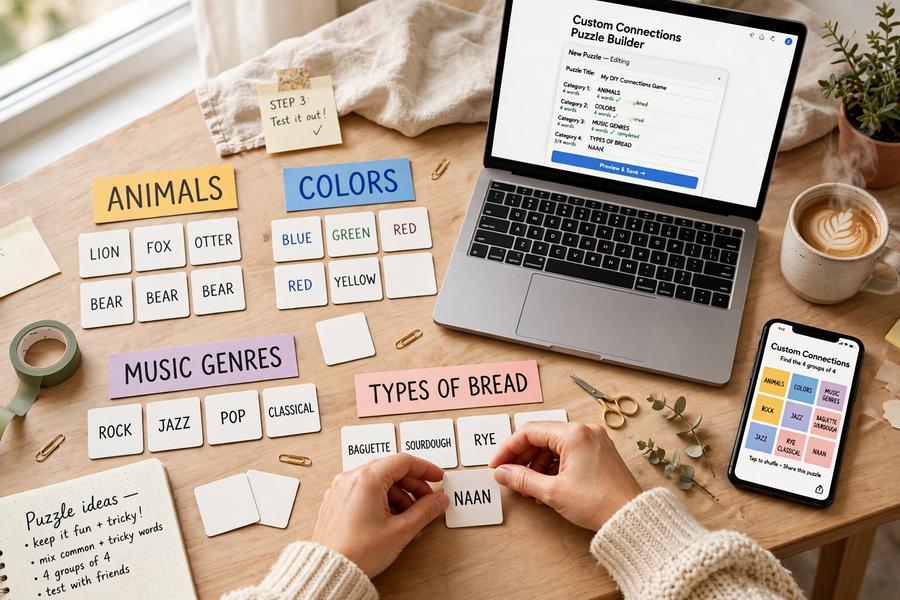
Yes! You can make your own Connections game by choosing words, organizing them into groups, and giving each group a shared theme. Creating a custom puzzle is a fun way to explore word associations, test your creativity, and challenge friends with connections they haven’t seen before.
Whether you want to create a puzzle for family game night, challenge fellow word-game enthusiasts, or come up with a tricky word-grouping challenge, a Connections game maker makes it easy to turn your ideas into a playable puzzle.
What Is a Connections Game Maker?
A Connections game maker is a tool that allows you to create your own version of the popular word-grouping puzzle. Instead of solving a puzzle someone else has designed, you decide which words appear and how they connect.
In a typical Connections puzzle, players are presented with a grid of words and must sort them into groups of four based on a common theme. The themes might involve synonyms, everyday objects, familiar expressions, pop culture, or unexpected relationships between words.
When creating your own puzzle, you choose the themes and select words that fit each one. The challenge is to make the connections clear enough to be solvable while still giving players something interesting to think about.
How to Create Your Own Custom Connections Game
You don’t need to build a game from scratch or know how to code to get started. With our custom Connections creator, you can design a puzzle and share it with other players.
Here’s how the process works:
1. Choose Your Categories
Start by deciding on the themes you want to include. You might choose types of food, famous characters, sports, animals, synonyms, or more creative word associations.
Try to choose categories that are distinct from one another while still making the overall puzzle interesting.
2. Add Words to Each Group
Select four words for each category, making sure every word fits the intended connection. Think about possible alternative meanings, too. Words that seem to fit more than one group can make a puzzle especially challenging, but the intended answers should still make sense.
3. Arrange the Difficulty
Consider how difficult you want your puzzle to be. You can organize the groups from easiest to hardest using the available ordering controls. The group colors follow their order, helping you create a puzzle with a clear progression in difficulty.
4. Preview Your Puzzle
Check the preview to see how your game will look to players. You can shuffle the words and review the layout before sharing, helping you spot any confusing combinations or unintended connections.
5. Generate a Link and Share It
Once you’re happy with your creation, generate a unique link to your puzzle. Send it to friends, family, or other puzzle fans so they can try to uncover the hidden groups.
Players can open the shared game and test their ability to identify the connections you’ve created.
Create a Custom Connections Game on Our Website
Ready to try making your own puzzle? Our Custom Connections tool lets you build a personalized word-grouping game without having to develop the game yourself.
Visit the Custom Connections Game Maker to choose your word groups, preview your puzzle, arrange the categories, and generate a shareable link.
You can create a challenge around almost any suitable topic, from general knowledge and vocabulary to inside jokes and themes your friends will recognize. It’s a great way to make the game your own and give other players a fresh challenge.
Tips for Making a Great Connections Puzzle
A good custom puzzle should be challenging without feeling unfair. Keep these tips in mind when designing yours:
- Choose clear connections. Each group should have a logical theme that explains all four words.
- Avoid overly broad categories. If a word could fit almost any group, the puzzle may become frustrating.
- Use misleading words carefully. Overlapping possibilities can make the game more interesting, but players should still be able to identify the intended answer.
- Balance the difficulty. Include a mix of straightforward and more challenging categories.
- Test the puzzle before sharing. Preview your game and check whether the groups make sense.
- Think about your audience. Familiar themes can be great for casual players, while specialized references may suit friends who share particular interests.
Can You Challenge Friends With Your Custom Game?
Absolutely! Once you generate a shareable link, you can send your puzzle to friends and see whether they can find all the correct groups. You can compare results, discuss tricky categories, and discover which connections proved most difficult.
You could even create themed puzzles for birthdays, classroom activities, family gatherings, or friendly competitions. The possibilities depend on the words and categories you choose.
Frequently Asked Questions
Is there a free Connections game maker?
You can use the Custom Connections creator on our website to make your own word-grouping puzzle. Visit the page to explore the available creation features.
Do I need coding skills to make a custom Connections game?
No coding is needed to use our custom game creator. You can add your word groups, preview the puzzle, arrange the categories, and generate a link using the available tools.
Can I share my custom Connections puzzle?
Yes. After creating your puzzle, generate its unique link and share it with friends or other players so they can try solving it.
What words should I use in my Connections game?
Choose four words that share a specific connection for each category. You can use synonyms, animals, foods, famous people, expressions, or any other suitable theme, provided the relationship between the words is clear.
Where can I play regular Connections games?
If you’d rather solve a puzzle than create one, visit Connections UK to play the daily game or explore unlimited puzzles.
Bottom-line: Start Building Your Own Connections Puzzle
Making a Connections game is a creative way to enjoy word puzzles from a different perspective. Instead of searching for hidden relationships, you get to design them yourself and challenge others to discover what you’ve planned.
Whether you’re creating a simple puzzle for friends or a tricky challenge for experienced players, your next game can start with just a few ideas and carefully chosen words.
Ready to become a Connections game maker? Visit our Custom Connections page and create a puzzle you can share with others.